In the world of cryptocurrency, private keys are everything. If you hold Qtum (QTUM) tokens and store them using Qtum Core — the full-node desktop wallet — your private keys are the single point of failure between you and your digital assets. A lost key means lost funds, with no customer support hotline to call. This comprehensive guide walks you through cold backup strategies for your Qtum Core private keys, ensuring that your assets remain safe against hardware failure, theft, natural disasters, and human error.
Why Cold Backup Is Non-Negotiable for Qtum Core Users
Qtum Core is a full-node wallet, meaning it downloads and validates the entire Qtum blockchain on your local machine. While this gives you maximum sovereignty over your keys, it also means you bear full responsibility for their protection.
Here are the top threats that make cold backup essential:
- Hardware failure: Hard drives crash, SSDs degrade, and laptops get dropped.
- Software corruption: OS updates, malware, or filesystem errors can wipe wallet files.
- Physical disaster: Fires, floods, earthquakes, and theft can destroy or steal devices.
- Human error: Accidental deletion, formatting a drive, or forgetting passwords.
- Ransomware/malware: Hackers can encrypt or steal wallet.dat files from your computer.
Cold backup means storing your private key data completely offline, disconnected from any networked device, making it immune to remote hacking and digital corruption.
Understanding Qtum Core Wallet Structure
Before creating backups, it's important to understand what you're protecting:
| Component | Description |
|-----------|-------------|
| wallet.dat | The primary file containing your private keys and key metadata. |
| Passphrase/Encryption | If you encrypted your wallet, the passphrase is needed to decrypt wallet.dat. |
| Addresses | Public addresses derived from your keys; these can be shared safely. |
| xpub/xpriv (HD Wallet) | Qtum Core uses BIP32/BIP44 hierarchical deterministic wallet derivation. |
Your most critical asset is wallet.dat combined with any encryption passphrase. Losing either one alone may mean losing access forever.
Step-by-Step: Creating a Cold Backup of Your Qtum Core Private Keys
Step 1: Locate Your wallet.dat File
Depending on your operating system, the Qtum Core data directory is typically found at:
- Windows:
C:\Users\[YourName]\AppData\Roaming\Qtum\wallet.dat

- macOS:
~/Library/Application Support/Qtum/wallet.dat - Linux:
~/.qtum/wallet.dat
Make sure Qtum Core is closed before copying the file to avoid data corruption during the copy process.
Step 2: Export Individual Private Keys (Optional but Recommended)
For additional redundancy, export individual private keys using the Qtum Core Debug Console:
listunspent          # Shows all unspent outputs
dumpprivkey "ADDRESS" # Dumps the private key for a specific address
Example:
dumpprivkey "QWERTYuiop..."
⚠️ Warning: Private keys displayed in the console are extremely sensitive. Anyone who sees them can steal your funds. Write them down offline immediately and never copy-paste them into unsecured documents.
Step 3: Choose Your Cold Storage Medium
Select one or more of the following offline media for storing your backups:
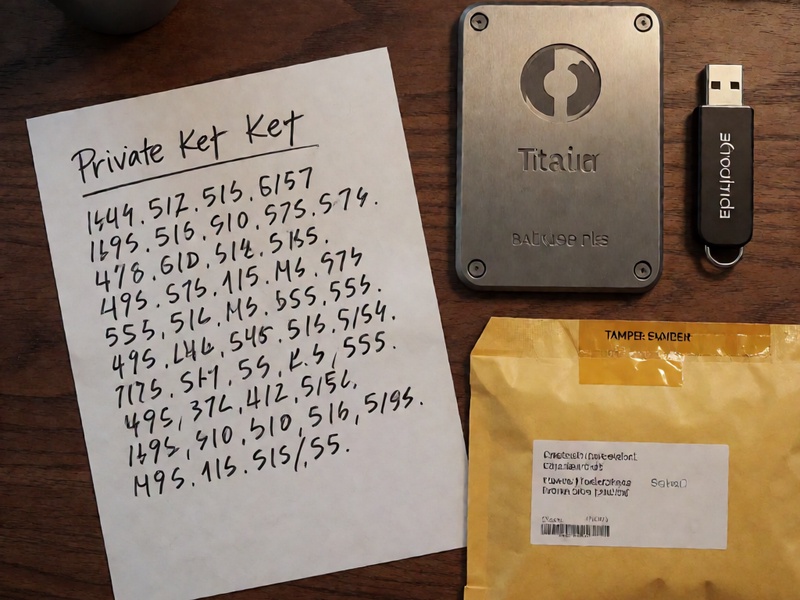
- Paper backup — Handwritten or printed on archival-quality paper.
- Metal backup — Engraved or stamped onto stainless steel or titanium plates (e.g., Cryptosteel, Billfodl).
- Encrypted USB drive — A USB stick that has never been connected to the internet, used solely for backup.
- Air-gapped computer — A dedicated device that has no network capability, used to store an encrypted copy.
Step 4: Encrypt Before Storing
If you choose a digital medium (USB, hard drive), always encrypt the backup before storing it:
- Use VeraCrypt or GPG to create an encrypted container.
- Choose a strong passphrase (20+ characters, mix of upper/lowercase, numbers, symbols).
- Store the passphrase in a separate physical location from the encrypted backup.
Step 5: Create Multiple Copies in Different Locations
Follow the 3-2-1 backup rule:
- 3 copies of your data.
- 2 different storage media (e.g., paper + metal, or paper + USB).
- 1 copy stored off-site (e.g., a safe deposit bank box, a trusted family member's safe).
Best Practices for Private Key Cold Backup Security
✅ Do This
- Test your backup periodically by restoring it to a spare Qtum Core installation on an offline machine.
- Use tamper-evident seals on paper and metal backups to detect unauthorized access.
- Record your wallet encryption passphrase separately — store it in a different location from wallet.dat.
- Keep a list of your public addresses in a separate, accessible location so you can monitor balances without touching the backup.
- Document your backup process in a secure will or instructions for heirs.
- Use BIP39 mnemonic seed phrases if possible — they are easier to store and restore across wallets.
❌ Avoid This
- Never store your backup on cloud services (Google Drive, Dropbox, iCloud) in unencrypted form.
- Never email or text your private keys or wallet.dat file to anyone, including yourself.
- Never reuse your wallet passphrase for any other online account.
- Never store all copies in the same building or on the same device.
- Never use screenshot tools to capture private keys — screenshots may persist in system caches.
- Never trust third-party "key recovery services" — they are almost always scams.
Restoring from a Cold Backup
If you ever need to restore your wallet, follow these steps:
- Install Qtum Core on a clean, offline computer.
- Copy your wallet.dat file into the Qtum data directory.
- Open Qtum Core and enter your encryption passphrase if prompted.
- Wait for sync (or use the wallet in offline mode to verify key restoration).
- Verify balances against the public addresses you recorded separately.
If you backed up individual private keys instead of wallet.dat:
- Open Qtum Core Debug Console.
- Use
importprivkey "YOUR_PRIVATE_KEY"for each key.
- The wallet will rescan the blockchain and import associated transactions.
Advanced Techniques for Maximum Protection
Multi-Signature Wallets
Qtum supports multi-signature (multisig) setups, where multiple private keys are required to authorize a transaction. This distributes trust and reduces the risk of a single point of failure.
Shamir's Secret Sharing (SSS)
Split your private key or wallet.dat backup into multiple shares using SSS (e.g., 3-of-5 scheme). Store each share in a different physical location. Only a minimum threshold of shares is needed to reconstruct the key.
Hardware Wallet Integration
For maximum security, consider transferring your Qtum holdings to a hardware wallet (e.g., Ledger, Trezor) and use Qtum Core only for advanced operations. Hardware wallets provide an additional layer of physical security with secure elements.
Common Mistakes and How to Avoid Them
| Mistake | Consequence | Prevention |
|---------|-------------|------------|
| Backing up wallet.dat while Qtum Core is open | Corrupted backup file | Always close the application first. |
| Storing passphrase on the same paper as private keys | Single point of theft/loss | Store separately in different locations. |
| Making only one backup | Total loss if that copy is destroyed | Follow the 3-2-1 rule. |
| Using pencil instead of ink on paper backup | Text fades over time | Use archival pen on acid-free paper. |
| Forgetting to update backup after new keys are generated | Missing funds after restore | Re-backup after significant wallet activity. |
| Not testing restore process | Backup is unreadable or incomplete when needed | Perform a test restore every 6–12 months. |
Final Thoughts
Your Qtum Core private keys represent your sovereign financial future. Unlike traditional banking, there is no safety net — you are the bank, the vault, and the insurance policy all at once. A well-executed cold backup strategy transforms this burden into peace of mind.
By following the steps and best practices in this guide — locating wallet.dat, exporting private keys, choosing robust offline media, encrypting sensitive data, creating multiple geographically distributed copies, and testing your restores — you significantly reduce the risk of permanent asset loss.
Start your cold backup today. Your future self will thank you.
Disclaimer: This guide is for educational purposes only. Always conduct your own research and consult with security professionals when handling significant cryptocurrency holdings.