Losing access to a TRON hardware wallet — whether through device failure, physical damage, or a forgotten PIN — is stressful enough. But the moment of real risk is the recovery itself. A single misspelled seed word, the wrong derivation path, or a misplaced passphrase can restore a perfectly valid but completely different wallet, leaving you staring at a zero balance and wondering if your TRX and TRC-20 tokens are gone forever.
In most cases, they are not. Your funds still sit safely on the TRON blockchain; you simply derived the wrong keys. That is exactly why data integrity checks are the heart of any TRON hardware wallet recovery. At Crypto Wallet Recovery Guide, we recommend treating every recovery as a two-phase process: first restore, then verify — before moving a single token.
Understanding TRON Hardware Wallet Architecture
Before you can verify anything, you need to know what correct actually looks like.
BIP39 Mnemonics and the Checksum Mechanism
Nearly every modern hardware wallet (Ledger, Trezor, Keystone, SafePal) generates a 12- or 24-word recovery phrase following the BIP39 standard. What many users do not realize is that the final word is not purely random — it encodes a checksum derived from the preceding entropy:
- A 12-word phrase carries 128 bits of entropy plus a 4-bit checksum.
- A 24-word phrase carries 256 bits of entropy plus an 8-bit checksum.
This means wallet software can mathematically detect most transcription errors. If one word is wrong, the checksum usually fails and the device warns you — but not always. Roughly 1 in 16 incorrect 12-word phrases still passes the checksum by pure chance, which is why checksum validation alone is never enough.
The TRON Derivation Path
TRON addresses are derived from your seed using the BIP44 standard with coin type 195:
m/44'/195'/0'/0/0
44'— BIP44 purpose195'— TRON's registered coin type0'— first account0— external chain0— first address index
If you restore the same 24 words but the wallet software applies a different path (for example, an Ethereum path), you will still get valid keys and valid addresses — just not your TRON addresses. This is one of the most common causes of the classic empty-wallet-after-recovery panic.
The TRON Address Format
TRON mainnet addresses are easy to recognize:
- They always begin with the letter T.
- They are 34 characters long.
- They are encoded in Base58Check: a 0x41 prefix plus a 20-byte public key hash, with a 4-byte double-SHA256 checksum appended.
That built-in checksum means any single-character typo in a TRON address is almost guaranteed to be rejected by wallet software — a feature you can leverage when verifying a restored address.
Step-by-Step: Data Integrity Checks During TRON Recovery
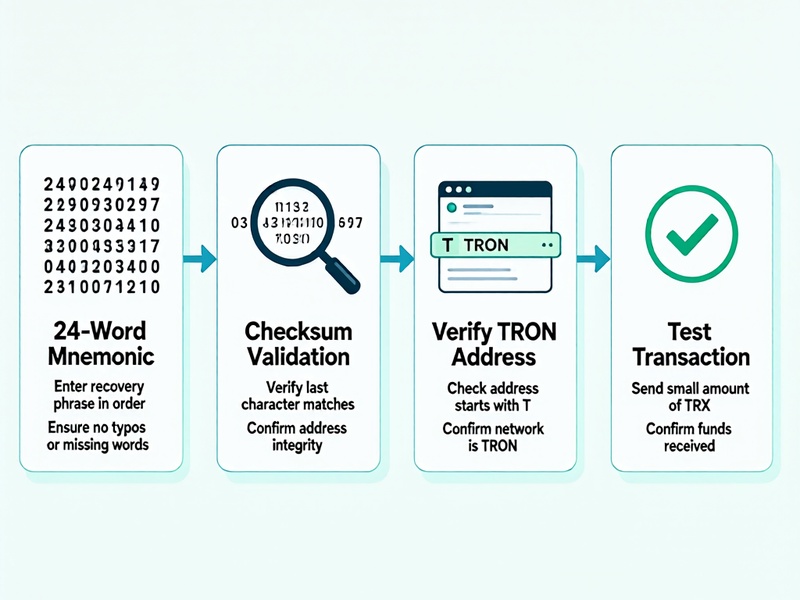
Step 1: Verify Every Word Against the BIP39 Wordlist
Before anything else, confirm that each word in your backup exists in the official 2048-word English BIP39 wordlist. Common errors include:
- Similar-looking words (only one variant typically exists in the list)
- Misspellings introduced by handwriting
- Words from non-English wordlists accidentally mixed in
A word absent from the list is a guaranteed transcription error. If you are missing one or two words entirely, open-source tools like btcrecover can brute-force the missing positions against the wordlist — a technique we cover in depth in our advanced recovery tutorials.
Step 2: Validate the Mnemonic Checksum Offline
On an air-gapped computer (never a device connected to the internet), load a trusted offline tool such as the standalone BIP39 page by Ian Coleman, downloaded beforehand from the official GitHub repository. Enter your phrase and confirm:
- The tool reports a valid checksum.
- The derived seed fingerprint matches your records, if you saved it.
If the checksum fails, at least one word is wrong or out of order. Do not proceed until this is resolved.
Step 3: Restore on the Hardware Device Itself
Wherever possible, perform the actual restore on a genuine hardware wallet rather than typing your seed into any computer or phone. During setup:
- Choose Restore from recovery phrase.
- Enter the words using the device's own interface.
- If your original wallet used a passphrase (25th word), re-enter it exactly — including case, spaces, and punctuation. A wrong passphrase does not produce an error; it silently produces a different wallet.
Step 4: Confirm the Derivation Path in the Companion App
Once restored, connect the device to its official companion software (for example, Ledger Live with the TRON app installed) and confirm the path shown is m/44'/195'/0'/0/0 for your first account. If you used multiple accounts, increment the account index: m/44'/195'/1'/0/0, and so on.
Step 5: Cross-Check the Restored TRON Address
Compare the restored receive address against your own records — an old exchange withdrawal history, a payment screenshot, or a watch-only wallet entry. Verify at least the first 6 and last 6 characters. Thanks to Base58Check encoding, even partial matching is strong evidence of a correct restore.
If the address does not match, do not panic. Work through the variables systematically:
- Was a passphrase applied — or not applied?
- Is the account index correct?
- Is the word order correct?
- Is the BIP39 checksum valid?
Step 6: Verify Balances and History On-Chain
Paste the restored address into a public block explorer such as Tronscan and confirm:
- TRX balance
- TRC-20 token balances (USDT, USDC, and others)
- Transaction history matches your memory
- Bandwidth and Energy resources, plus any frozen or staked TRX
Remember: the blockchain is the ultimate source of truth. Even if a companion app shows zero due to a sync or API issue, Tronscan reads directly from the chain.
Step 7: Send a Small Test Transaction First
Before moving your full balance, send a small amount of TRX to an address you control and confirm it arrives. This proves the restored private key actually signs transactions correctly — the final and most conclusive integrity check of all.
Warning Signs of a Failed Integrity Check
Stop and reassess if you encounter any of the following:
- Invalid checksum or invalid recovery phrase warnings
- A restored address that does not match your historical address
- Zero balance with zero transaction history on Tronscan (a genuinely used wallet always leaves a trace)
- A wallet that appears valid but is empty — the classic symptom of a passphrase mismatch or wrong derivation path
Each of these situations is recoverable with methodical troubleshooting. Our site provides detailed walkthroughs for partial mnemonic recovery, passphrase brute-forcing with btcrecover and Hashcat, and derivation-path scanning for exactly these scenarios.
Security Best Practices During Recovery
- Work offline whenever possible. Checksum validation and address derivation should happen on an air-gapped machine.
- Never type your seed into a website. No legitimate recovery service, support agent, or airdrop will ever ask for your 24 words.
- Download tools only from official GitHub repositories and verify release signatures or hashes.
- Beware of phishing clones of Tronscan, TronLink, and Ledger Live — check URLs character by character.
- Wipe temporary files and clear clipboard data after any software-based verification.
Preventing the Next Crisis
Once your wallet is restored and verified, harden your setup:
- Keep two or more backups of your seed phrase in geographically separate locations, ideally on fire-resistant metal plates.
- If you use a passphrase, document your hint system — never store the passphrase itself next to the seed.
- Perform a recovery drill once a year: restore onto a spare device and verify the address matches.
- Consider advanced schemes such as SLIP39 (Shamir backup) on devices that support it.
Conclusion
A TRON hardware wallet recovery is not finished when the device says the restore is complete — it is finished when you have verified the checksum, confirmed the derivation path, matched the address, checked the on-chain balance, and signed a successful test transaction. Each integrity check closes a different failure mode, and together they turn a nerve-wracking restore into a controlled, verifiable process.
If you are stuck — missing words, an unknown passphrase, or a restored wallet showing a zero balance — explore the rest of Crypto Wallet Recovery Guide for step-by-step tutorials on mnemonic reconstruction, password recovery with open-source tools, and hardware wallet backup strategies. Your funds are almost certainly still on-chain; the key is verifying your way back to them safely.