If you have lost access to a TRON wallet, a missing or incomplete mnemonic can feel like a dead end. The good news is that TRON wallets often follow open standards such as BIP39, BIP32, and BIP44. With the right offline setup, a clear plan, and verified tools, many recovery cases can be solved without exposing your seed phrase to the internet.
This guide from Crypto Wallet Recovery Guide explains how to approach TRON mnemonic recovery in an offline environment. It is written for legitimate wallet owners who need to restore their own TRX wallet, test a partial seed phrase, or understand how derivation paths affect recovery.
Why Offline Recovery Matters for TRON Wallets
Your mnemonic is the master key to your wallet. Anyone who sees it can recreate your private keys and drain your funds. Online recovery websites, cloud notes, screenshots, and messaging apps are common leak points. Even a brief connection to a malicious browser extension can compromise a seed phrase.
For that reason, serious TRON mnemonic recovery should happen on an air-gapped computer, a live USB operating system, or another machine that is never connected to the internet. You can move candidate mnemonics and public addresses between devices with QR codes, a USB drive, or a text file only after you understand the risks. Whenever possible, keep the mnemonic itself offline.
TRON, BIP39, and BIP32/BIP44: How Your Mnemonic Works
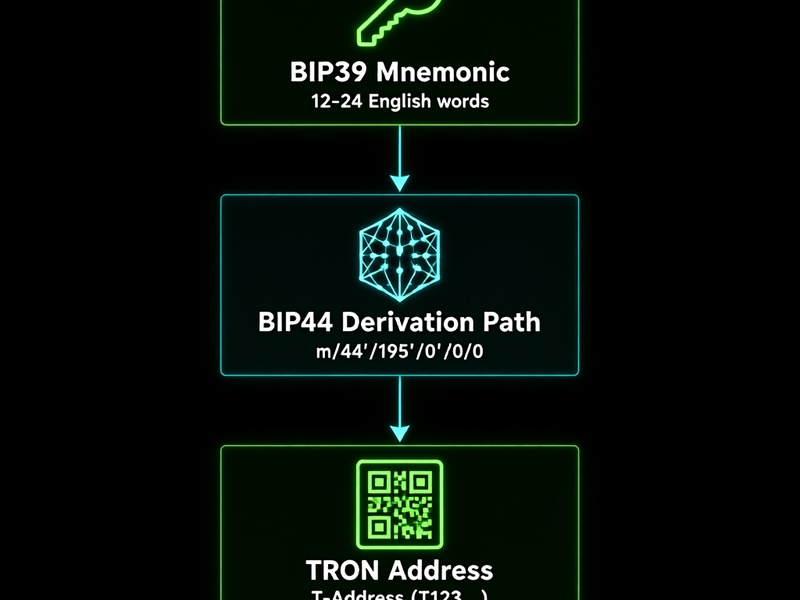
Most modern TRON wallets use a 12-word or 24-word BIP39 mnemonic. The words come from a standardized list, usually English, and include a checksum that helps detect typos. The mnemonic is converted into a seed. That seed is then used with BIP32/BIP44 derivation to create private keys and public addresses.
A common TRON derivation path is:
- m/44'/195'/0'/0/0
Here, 195 is the registered coin type for TRON. Many wallets, including TronLink and some hardware wallet integrations, use this path. However, not every wallet follows the same path. Some legacy or multi-chain wallets may use an Ethereum-style path such as m/44'/60'/0'/0/0 to derive a TRON address. If your first recovery attempt fails, the derivation path is one of the first things to check.
A BIP39 passphrase, sometimes called the 25th word, can also change the seed without changing the mnemonic. If you used one, you must enter it exactly as created. It is case-sensitive and may include spaces or symbols.
Before You Start: Safety and Legal Checklist
Only attempt to recover a wallet that you own or have explicit permission to recover. Unauthorized access to someone else's wallet is illegal and unethical.
Follow these safety rules:
- Work offline. Disconnect Wi-Fi, Ethernet, Bluetooth, and mobile hotspots.
- Use a clean, trusted computer. A dedicated live USB is ideal.
- Download tools in advance, verify checksums, and transfer them to the offline machine.
- Never enter your seed phrase into a website, chat, email, or cloud document.
- Do not take photos of your mnemonic or recovery screen.
- Keep the room private. Cover windows and disable smart cameras if practical.
- Test with a small wallet first if you are learning the process.
- Write down every step so you can repeat or undo it safely.
What You Need for TRON Mnemonic Recovery
Before starting, collect as much information as possible:
- Any known words from the mnemonic and their positions.
- The number of words: 12 or 24, or possibly 15, 18, 21.
- The language of the word list, such as English, Spanish, French, or Japanese.
- A known TRON address from the wallet.
- The wallet app or device used, such as TronLink, Ledger, Trust Wallet, or a hardware wallet.
- Any BIP39 passphrase you may have used.
- Any known derivation path or account index.
- Any old wallet files, keystore JSON files, or password hints.
Useful offline tools include the Ian Coleman BIP39 tool, Python libraries such as bip_utils, btcrecover and seedrecover for advanced recovery, and HashCat for wallet password or keystore cracking. Hardware wallets can also be used for final verification if you understand their recovery flow.
Step-by-Step Offline TRON Mnemonic Recovery
1. Build an Air-Gapped Recovery Station
Prepare a computer that will not connect to the internet. If possible, boot from a Linux live USB. Copy your recovery tools, BIP39 word lists, and notes to the machine using a USB drive. Disable networking before you enter any mnemonic words.
2. Verify the BIP39 Word List and Checksum
Download the official BIP39 word list for the language you used. Check that every known word appears exactly as written. BIP39 is case-insensitive in many tools, but spelling and accents matter. The checksum can quickly eliminate impossible word combinations.
3. Map Known Words and Positions
Create a table like this:
- Word 1: known
- Word 2: unknown
- Word 3: known
- Word 4: unknown
- ...
Include any partial memory, such as 'the first word started with S' or 'the last word was always the same.' Small clues dramatically reduce the search space.
4. Recover Missing Words with an Offline BIP39 Tool
If you are missing one or two words, an offline BIP39 recovery tool can generate candidates and filter them by checksum. For a 12-word mnemonic, the checksum reduces the number of valid candidates significantly.
Approximate difficulty examples:
- 1 missing word: about 2048 candidates before checksum; very manageable.
- 2 missing words: about 262,144 checksum-valid candidates; manageable with a script.
- 3 missing words: millions of candidates; possible but slower.
- More missing words: you will need stronger clues, a known address, or professional help.
For 24-word mnemonics, the checksum is stronger, but the total search space is also much larger. Missing three or four words can become impractical without additional information.
5. Derive TRON Addresses from Candidates
For each candidate mnemonic, derive the TRON address and compare it with your known address. A simplified Python example using bip_utils looks like this:
from bip_utils import Bip39SeedGenerator, Bip44, Bip44Coins, Bip44Changes

mnemonic = 'word1 word2 word3 ...'
seed = Bip39SeedGenerator(mnemonic).Generate()
acct = Bip44.FromSeed(seed, Bip44Coins.TRON).Purpose().Coin().Account(0).Change(Bip44Changes.CHAIN_EXT).AddressIndex(0)
print(acct.PublicKey().ToAddress())
Run this script only on your offline machine. If you use a different wallet or derivation path, adjust the account, change, and address index values. Some wallets start at account 0, address index 0, while others may use a different sequence.

6. Compare Against Known TRON Addresses
A TRON address usually starts with T. Compare the generated address with your known address character by character. Do not rely on a screenshot if you can avoid it. If you have multiple addresses from the same wallet, generate the first few addresses in the sequence and compare them all.
If the address matches, you have found the correct mnemonic and derivation path. Import the mnemonic into a secure offline or hardware wallet, verify the balance, and then move funds to a new wallet if you suspect the old seed was ever exposed.
7. Handle Passphrases and Multiple Derivation Paths
If no address matches, check for a BIP39 passphrase. Even a single extra space or uppercase letter can produce a completely different wallet. Next, test common TRON derivation paths:
- m/44'/195'/0'/0/0
- m/44'/195'/0'/0
- m/44'/195'/0'
- m/44'/60'/0'/0/0
- m/44'/60'/0'/0
Also test account indexes such as 0, 1, and 2. Some wallets allow multiple accounts, and your funds may be on a later index.
8. If You Have an Encrypted Keystore or Wallet Password
Sometimes the mnemonic is known, but the wallet file or hardware wallet password is lost. Offline password recovery tools such as HashCat and btcrecover can help with encrypted wallet files or password-protected backups. This is a separate task from mnemonic recovery, but the same offline rule applies. Never crack a wallet file you do not own.
Partial Mnemonic Recovery Strategies
Partial mnemonic recovery is a puzzle. The goal is to combine memory, structure, and checksum filtering.
Useful strategies include:
- Test word order variations if you remember the same words but not their exact order.
- Try common first and last words, then let the checksum filter the rest.
- Check for repeated words. BIP39 allows repeated words, so do not assume every word is unique.
- Consider spelling mistakes. 'abandon' is not the same as 'abandons.'
- Confirm the word list language. A Spanish mnemonic cannot be recovered with an English list.
- Use your known TRON address as the final oracle. Only a correct mnemonic and derivation path will produce it.
- Split the problem. Recover one missing word at a time if possible.
- Keep a candidate log. Advanced recovery can produce thousands of results, and you need track progress.
Common TRON Derivation Paths to Test
TRON wallets are not perfectly uniform. If your first attempt fails, try these paths and settings:
- m/44'/195'/0'/0/0
- m/44'/195'/0'/0
- m/44'/195'/0'
- m/44'/195'
- m/44'/60'/0'/0/0
- m/44'/60'/0'/0/0 with a BIP39 passphrase
- Account index 0, 1, 2, and higher
- Change level 0 or 1
- Address index 0 through 10
A hardware wallet may also ask for a passphrase during recovery. Enter it only on the device itself when possible.
Tools for Offline TRON Recovery
Here are tools commonly used in legitimate wallet recovery:
- Ian Coleman BIP39: a browser-based tool that can be downloaded and run offline. It derives addresses from mnemonics and supports many coins.
- bip_utils: a Python library for BIP39, BIP32, and BIP44 derivation across many blockchains.
- btcrecover and seedrecover: advanced tools for seed phrase and wallet password recovery.
- HashCat: GPU-accelerated password recovery for supported wallet files.
- TronLink or a hardware wallet: useful for final import and balance verification, but only after the recovery is complete.
- A local TRON node or offline address generator: helpful if you want to avoid online address lookups.
Always verify the source and checksum of any tool before using it. A fake recovery tool is one of the easiest ways to lose your funds.
Troubleshooting TRON Mnemonic Recovery
If recovery is not working, check these common issues:
- Wrong word list language.
- Extra spaces or missing spaces.
- Incorrect word order.
- Typos in one or more words.
- Wrong derivation path.
- Missing BIP39 passphrase.
- Wrong account index.
- Wallet used a non-standard derivation method.
- The mnemonic belongs to a different blockchain or wallet.
Start with the simplest explanation. Many recovery failures are caused by a single wrong word or a different derivation path.
Prevention: Avoid Permanent TRON Wallet Loss
The best recovery is the one you never need. Protect your TRON wallet with these habits:
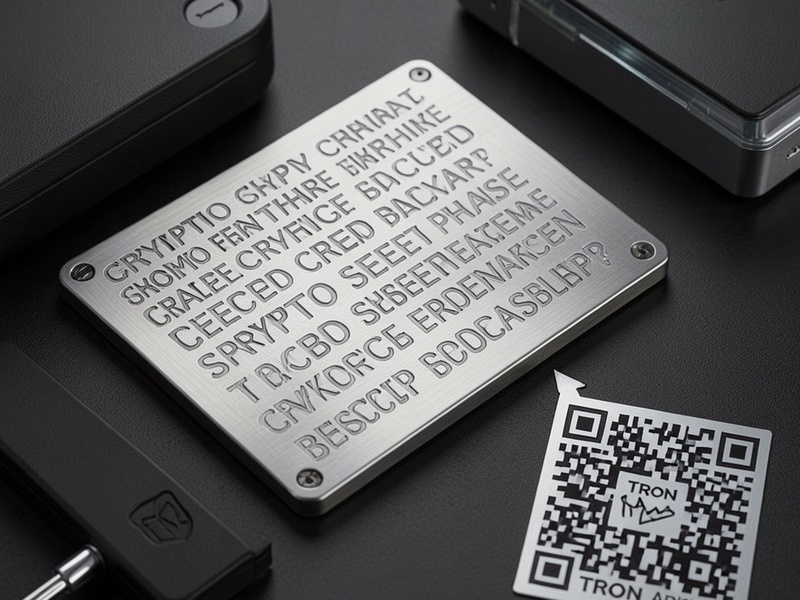
- Back up your mnemonic on steel or another durable offline medium.
- Store multiple copies in separate secure locations.
- Use a BIP39 passphrase if it fits your threat model, and back it up separately.
- Test your backup by restoring to a temporary wallet before storing large funds.
- Never store your seed phrase in a photo, email, cloud drive, or password manager without strong encryption.
- Record the wallet type and derivation path, but never store it with the seed phrase.
- Consider multisignature or inheritance planning for high-value holdings.
When to Seek Professional Help
If you are missing many words, the funds are high value, or the wallet file is damaged, professional recovery may be appropriate. Choose a reputable service, ask about their security process, and never send your full seed phrase to anyone unless you fully trust the provider and understand the risk. Many scams target people who are already in a vulnerable recovery situation.
Final Thoughts
TRON offline mnemonic recovery is a careful, methodical process. Work offline, protect your seed phrase, verify your tools, and test derivation paths before assuming the worst. With BIP39/BIP32/BIP44 knowledge and the right offline workflow, you can restore many TRON wallets and reduce the risk of permanent loss.
For more recovery guides covering Bitcoin, Ethereum, MetaMask, Electrum, Ledger, and other wallets, visit Crypto Wallet Recovery Guide. Always stay offline when handling seed phrases, and only recover wallets you own.