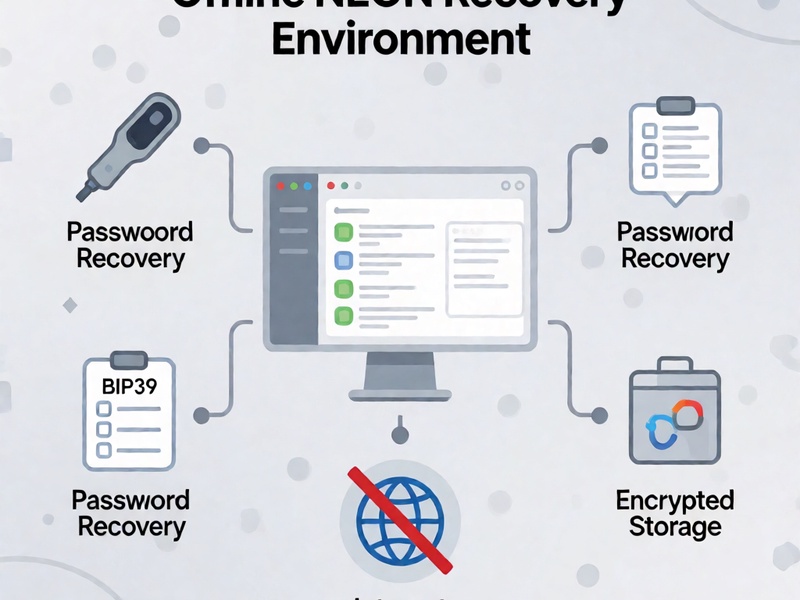
Losing wallet access is stressful, but a rushed password attempt on a normal online PC can turn a recoverable situation into a permanent leak. A professional NEON offline recovery environment is a clean, isolated workspace for checking seed phrases, decrypting wallet files, testing passwords, and organizing recovery attempts. In this guide, NEON means your local recovery sandbox. The label is less important than the controls: no internet, no cloud sync, no clipboard exposure, and no unverified software touching sensitive data. Think of it as the secure foundation of a practical Crypto Wallet Recovery Guide for Bitcoin, Ethereum, Electrum, MetaMask, Ledger, MyEtherWallet, and other self-custody setups.
Why the environment comes first
If you are recovering from partial memory, forgotten passwords, damaged files, or hardware failures, the environment decides how safely you can investigate. An online machine can leak clipboard data, background telemetry, cached passwords, or malicious code. An isolated NEON workspace reduces that risk by limiting where wallet material exists and which tools can process it.
A good setup should:
- keep private keys and mnemonic fragments on one controlled machine or storage medium
- separate raw inputs, generated candidates, cracked results, and notes
- avoid browser-based recovery pages and online seed validators
- run only tools whose files were downloaded once and verified before network removal
- create a simple audit trail so you know what changed and when
Recommended NEON setup models
There is no single perfect setup. Choose based on budget, technical comfort, and how sensitive the data is.
Dedicated air-gapped laptop - best for serious recovery work. Use a machine that never connects to a network after setup. Store the recovery workspace on an encrypted partition and keep backups of non-secret notes separately.
Live USB environment - useful for temporary recovery sessions. Boot from a clean USB, install or run local tools, and save outputs only if the USB is encrypted. This model is good when your main computer may be compromised.
Local virtual machine - a VM is convenient for testing dictionaries and scripts. It is not automatically secure if the host OS is infected, so treat the host as potentially compromised. Use encrypted disk files, snapshots, and no shared clipboard, folders, or USB passthrough unless needed.
Step-by-step build process
1. Prepare a clean base system
Start with a minimal OS image. Download the ISO on a separate machine, verify its checksum, then write it to a trusted USB drive. If possible, disable Wi-Fi and Bluetooth before first boot. Avoid installing unnecessary services, browser extensions, update agents, or cloud drives.
2. Create a simple workspace structure
Use a small, clear folder layout. Inside the NEON environment, create a root folder such as /neon-recovery/. A practical structure is:
- /neon-recovery/input/
- /neon-recovery/tools/
- /neon-recovery/work/
- /neon-recovery/output/
- /neon-recovery/notes/
Store only the data you need for recovery. Keep encrypted wallet files in input, verified offline tools in tools, candidate dictionaries and logs in work, and confirmed results in output. Do not place private keys in cloud notes or browser tabs.
3. Install trusted tools offline
Prepare an offline package bundle on another clean machine. Include:
- Python runtime and required packages for seed utilities
- btcrecover for wallet file password and seed recovery
- Hashcat, sometimes searched as HashCat, for GPU-based password cracking
- Pywallet or equivalent wallet-file inspection tools
- BIP39 utilities for checksum validation and seed generation tests
- checksum tools, archive utilities, and text-processing helpers
Transfer the bundle to the NEON machine through one-way or controlled USB. Verify file hashes before running anything. Do not execute unknown binaries from random recovery scripts.
4. Lock down the environment
Before opening sensitive files:
- disable network adapters
- turn off auto-connect services
- disable clipboard sharing in VM mode
- close email, messaging, and remote-desktop clients
- prevent automatic screenshots from recording private data
- use local passwords only, not passwords copied from online accounts
If you must test a candidate online later, use the public address only. Never send a private key, full seed, or raw vault to a website.
Seed and mnemonic recovery workflow
Mnemonic work is often not brute force. It is constrained reasoning. Start with what you remember: number of words, partial words, wrong word order, omitted words, duplicate words, and BIP39 or BIP32 context.
Confirm the wallet standard - Electrum uses its own seed logic in many versions. Ledger may use non-standard formats in older devices. MetaMask and MyEtherWallet often rely on browser extension state or JSON files, not necessarily a raw seed you enter manually. Bitcoin wallets can use BIP39, custom seeds, or old dump formats.
Validate checksum first - a valid BIP39 12-word or 24-word phrase should pass checksum. If it fails, the issue may be a wrong word, wrong order, wrong language, missing word, or a passphrase mistaken for part of the seed.
Build constrained candidate lists - use known fragments, first letters, phonetic hints, and likely mistakes. Do not randomly generate all 12-word or 24-word combinations unless the search space is truly small. Use rules instead of mass guessing.
Match to a known public address - generate candidate addresses offline and compare with an address you already know. That confirms the seed without exposing the private key. Keep candidate generation local.
Password recovery workflow
Password recovery becomes more effective when you know the file type. Bitcoin Core wallet.dat, Electrum encrypted files, MetaMask vaults, MyEtherWallet JSON stores, and other encrypted blobs need different tool paths.
- Identify the encrypted object first. Do not run a generic attack on every file.
- Use btcrecover when you know part of the password, such as length pattern, known fragments, or custom masking.
- Use Hashcat for formats it supports well, especially with GPU acceleration and targeted rules.
- Keep dictionaries personal. Build from names, old addresses, pet names, birth patterns, keyboard walks, and common phrase structures you use.
- Test passphrases separately. A BIP39 passphrase may be distinct from the local wallet file password.
- Log every run with tool, mode, dictionary, date, and result in output notes.
Hardware wallet and cold-storage notes

Hardware wallets require different caution. If the seed is intact, restore using official device instructions and verify a known address. If the device is damaged and no backup seed exists, do not assume software can solve it. Some devices cannot safely extract a seed through normal tools, and forcing an unsupported process may damage recovery options.
For cold wallets:
- separate the seed from any password that protects a backup file
- verify addresses before sending a test transfer
- treat old printed backups as partial data, not guarantees
- never enter a recovered seed into an online form to check it
Common mistakes that cause permanent loss
- Testing a seed phrase on a website because the UI looks trustworthy.
- Copying words into clipboard history, chat messages, or cloud notes.
- Using random wordlists that include phrases likely owned by other people.
- Assuming a hardware reset is the first step when the seed is still unknown.
- Forgetting that a wallet file password and a BIP39 passphrase are different secrets.
- Reconstructing a 24-word seed by memory alone without checksum rules and address validation.
Practical checklist before starting
Before you begin, write the plan and keep it offline:
- I control the wallet or have proof of ownership.
- The machine is air-gapped or treated as high-risk local only.
- Tools were downloaded on another machine and verified.
- Inputs live only under /neon-recovery/input/.
- I know the wallet format: Bitcoin, Ethereum, Electrum, MetaMask, Ledger, MyEtherWallet, or another type.
- I know whether the missing secret is a mnemonic, password, passphrase, or both.
- I have a public address for safe validation.
- I will stop if the environment requires a network step that exposes keys.
Summary
A professional NEON offline recovery environment is not just a VM or a USB. It is a controlled workflow: clean OS, isolated folders, verified tools, constrained candidate generation, offline checksum and address checks, and no cloud exposure. When built properly, it supports a practical Crypto Wallet Recovery Guide approach for lost mnemonics, forgotten passwords, damaged wallet files, and partial backups. The most important rule is simple: build the safe workspace first, then let each test answer one narrow question without leaking the secret you are trying to save.