Legal and ethical boundary: This guide is for recovering wallets you own and control. It is not a tool for accessing someone else's funds. Never share, paste, photograph, or upload a seed phrase or private key. Any script you run must be audited, offline, and open source.
Why Basic Recovery Is Not Enough
For casual users, recovery means importing a mnemonic into a wallet. For imToken veterans, that is only step one. A real recovery plan must account for:
- Multiple chains and address formats
- Different BIP39 passphrases and derivation paths
- Tokens, NFTs, staking positions, and DeFi approvals
- RPC failures, chain ID mismatches, and nonce gaps
- Privacy and operational security
An advanced script recovery solution turns these variables into a repeatable, verifiable workflow. It does not replace a hardware wallet. It supports it.
Core Principles
- Offline first. Secrets stay on an air-gapped device or hardware wallet.
- Read-only before write. Scan balances and history without signing anything.
- Verify on device. Every address and transaction must be checked on trusted hardware.
- Least privilege. Scripts get no secrets, no seed phrases, and no broadcast rights.
- Deterministic tools. Use checksummed releases, pinned dependencies, and reproducible builds.
- Small tests. Send a minimal test transaction before moving meaningful value.
The Advanced Script Recovery Stack
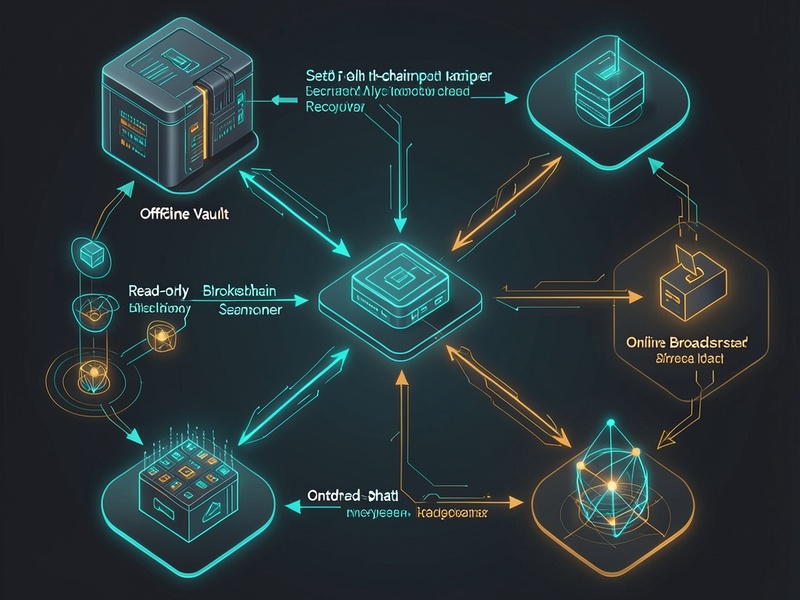
A clean imToken recovery workflow can be divided into six modules:
- Vault layer: Hardware wallet, metal backup, or encrypted offline storage.
- Derivation mapper: Generates candidate addresses from a mnemonic and known paths. It never logs the mnemonic.
- Read-only scanner: Queries RPCs and explorers for native balances, token balances, NFTs, approvals, and transaction history.
- Transaction builder: Creates unsigned transactions for transfers, approval revocations, or consolidations.
- Air-gapped signer: Signs transactions offline after device verification.
- Broadcaster and cleaner: Sends signed transactions through your own node or trusted RPC, then revokes risky approvals and updates backups.
Phase 1: Prepare a Trusted Environment

Before you write or run any recovery script:
- Use a clean operating system with full-disk encryption.
- Disable Wi-Fi, Bluetooth, and cellular connections on the secret-handling machine.
- Use a hardware wallet for signing whenever possible.
- Keep an offline copy of your recovery plan, derivation paths, and address labels.
- Download tools only from official repositories and verify hashes.
- Never use clipboard, screenshots, cloud notes, or chat apps for secrets.
If you do not have a hardware wallet, treat the recovery machine as hostile until proven clean. A dedicated offline device is not paranoia; it is basic self-custody hygiene.
Phase 2: Map Derivation Paths
Derivation paths are where most advanced recoveries fail. imToken and other multi-chain wallets may use different paths for different assets. Your script should:
- Accept a mnemonic only through a secure, local input method.
- Generate addresses for common paths, such as BIP44, BIP49, BIP84, and chain-specific variants.
- Compare generated addresses against known receive addresses or transaction history.
- Record matched paths without recording the mnemonic.
- Support an optional BIP39 passphrase if you used one.
A simple pseudocode concept:
- Read secret from an offline hardware device.
- For each candidate path, derive the first N addresses.
- Compare each address to your known address list.
- Output only path names and public addresses.
- Wipe memory and temporary files after the session.
Never brute-force unknown wallets. Never test random mnemonics. If you cannot prove ownership, stop.
Phase 3: Read-Only Multi-Chain Discovery
Once you know the addresses, scan them without signing:
- Native coin balances

- ERC-20, TRC-20, BEP-20, and other token balances
- NFTs and collectibles
- Staking, lending, and liquidity positions
- Token approvals and spending allowances
- Pending or failed transactions
Use your own node when possible. Public RPCs are convenient but may rate-limit, log metadata, or return stale data. Cross-check important balances with at least two sources. Record block heights so your scan is reproducible.
Phase 4: Build and Simulate Unsigned Transactions
Your script can prepare transactions, but it should not sign them. For each action:
- Set the correct chain ID.
- Use current nonce values.
- Estimate gas and priority fees.
- Simulate the transaction on-chain or against a fork.
- Decode contract calls before signing.
- Verify recipient addresses character by character.
For complex DeFi exits, consider using a battle-tested interface with hardware wallet support instead of a custom script. The goal is recovery, not cleverness.
Phase 5: Air-Gapped Signing
Signing is the trust boundary:
- Move the unsigned transaction to the air-gapped signer.
- Verify every field on the hardware wallet screen.
- Confirm the recipient address and amount.
- Sign the transaction.
- Move the signed transaction back to the online broadcaster.
If the hardware wallet screen and the script disagree, stop. The script is wrong or compromised.
Phase 6: Broadcast, Consolidate, and Clean Up
After broadcast:
- Monitor confirmations on a block explorer.
- Move remaining assets to a fresh, clean wallet with a new seed phrase.
- Revoke unnecessary token approvals.
- Update your backup and recovery documentation.
- Retire old addresses that may have been exposed.
- Consider multi-signature or hardware-backed security for long-term storage.
Common Pitfalls
- Wrong derivation path: Funds appear missing even though they are safe.
- Missing BIP39 passphrase: A different passphrase creates a different wallet.
- Address type mismatch: Legacy, nested SegWit, and native SegWit addresses are not interchangeable.
- Stale RPC data: Always verify balances at a known block height.
- Nonce gaps: Failed transactions can block later ones.
- Dust and UTXO management: Bitcoin recovery needs coin selection, not just address import.
- Approval risks: Old DeFi approvals can drain assets after recovery.
- Malicious scripts: A recovery script is a prime target for supply-chain attacks.
Security Checklist
- [ ] I own the wallet and can prove it.
- [ ] I am using an offline or air-gapped environment.
- [ ] My seed phrase never touches an online device.
- [ ] My script has no hardcoded secrets.
- [ ] Dependencies are pinned and hashes verified.
- [ ] I tested with a small amount first.
- [ ] I verified addresses on a hardware wallet.
- [ ] I revoked risky approvals after recovery.
- [ ] I moved assets to a new wallet when appropriate.
Final Thoughts
An advanced script recovery solution for imToken veterans is not a magic command. It is a disciplined process: map paths, scan read-only, build unsigned transactions, sign offline, broadcast carefully, and clean up. The best recovery script is the one that never sees your seed phrase. The best recovery plan is the one you tested before you needed it.
This is an independent security methodology, not an official imToken feature. Always follow local laws and platform terms. If the value is significant, consult a reputable security professional.