Introduction
The Cosmos ecosystem — home to ATOM, Osmosis, Juno, and hundreds of interconnected app-chains — has become a core part of many crypto portfolios. Hardware wallets are the gold standard for securing Cosmos assets, as they keep private keys offline and away from malware. But what happens if your device breaks, you lose your seed phrase, or you forget your PIN? This full Cosmos hardware wallet backup and recovery guide walks you through proactive backup strategies, step-by-step recovery for every common loss scenario, and non-negotiable security rules to protect your funds. For foundational wallet recovery principles that apply across Bitcoin, Ethereum, and other chains, our Crypto Wallet Recovery Guide offers complementary, expert-vetted guidance.
Pre-Loss: Proactive Cosmos Hardware Wallet Backup Best Practices
The easiest recovery is the one you never need to do. Follow these backup rules to minimize the risk of permanent asset loss:
1. Follow BIP39/BIP44 Standard Protocols
Most Cosmos-compatible hardware wallets use the BIP39 standard for 12 or 24-word seed phrases, and BIP44 derivation paths (the standard Cosmos path is m/44'/118'/0'/0/0). BIP39 seed phrases are generated from a fixed 2048-word list, with each word representing a segment of your private key; BIP44 defines how keys are derived from the seed for different blockchains, which is why the same seed can access assets across Cosmos and other chains if you use the correct derivation path. Understanding these standards ensures your backup works across most Cosmos wallets (Keplr, Cosmostation, Ledger, Trezor, etc.)
2. Generate & Verify Backups 100% Offline
Hardware wallets generate seeds offline by default — never generate a Cosmos wallet seed on an internet-connected device, even for testing. After writing down your seed, verify it by importing it to a separate offline wallet (e.g., an air-gapped Keplr mobile install) and confirming your receiving address matches your hardware wallet’s address.
3. Use Redundant, Physical Backup Methods
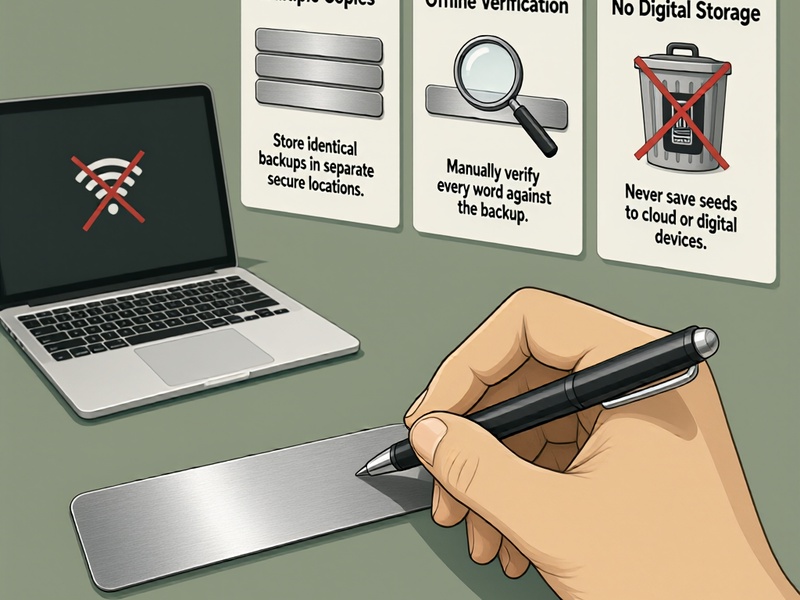
Never store your seed phrase digitally (no photos, no cloud notes, no text files). Opt for physical backups:
- Acid-resistant paper or metal seed plates (to survive fire, water, or wear)
- Multiple copies stored in geographically separate secure locations (e.g., home safe + safety deposit box)
- For advanced users: Shamir’s Secret Sharing (SSS) to split your seed into multiple shards, requiring a threshold of shards to recover the full seed (reduces risk of single backup theft)
4. Document Key Context (Not Sensitive Data)
Write down non-sensitive details to simplify future recovery: your wallet’s derivation path, the number of seed words (12 vs 24), and the hardware wallet model. Never write down your PIN or optional BIP39 passphrase alongside your seed.
Step-by-Step Cosmos Hardware Wallet Recovery Scenarios
Below are actionable recovery steps for the most common hardware wallet issues, all aligned with secure recovery best practices:
Scenario 1: Damaged/Lost Hardware Wallet, Full Seed Phrase Available
This is the most straightforward recovery scenario, as your seed phrase is the master key to your funds:
- Prep a new, unused Cosmos-compatible hardware wallet (or reset your existing device if it’s still functional but inaccessible)
- Set up the device in an offline, private space (no security cameras, no nearby devices with microphones/cameras)
- Select the "recover wallet" option, and enter your 12/24 BIP39 seed words in the correct order
- Install the Cosmos (ATOM) app and any other ecosystem app-chain apps you use (Osmosis, Juno, etc.)
- Verify your receiving addresses match your old wallet’s addresses before transacting. If you can’t find your assets, double-check your derivation path — our Crypto Wallet Recovery Guide has a full breakdown of common BIP44 path variations for Cosmos and other chains.
Scenario 2: Forgotten Hardware Wallet PIN, Full Seed Phrase Available
Most hardware wallets (including all major Cosmos-compatible models) will wipe all device data after 5-8 incorrect PIN attempts to prevent brute-force attacks. Do not repeatedly guess your PIN if you’re unsure.
Recovery steps:
- Let the device wipe (or manually reset it if you have the option)
- Recover your wallet using your full seed phrase, following the steps in Scenario 1
Common Myth Busting: There is no "backdoor" to bypass a hardware wallet PIN. Any service claiming to unlock your device remotely is a scam — your seed phrase is the only legitimate recovery method.
Scenario 3: Partial Seed Phrase Loss (1-5 Missing/Unclear Words)
If you remember most of your seed phrase but are missing 1-5 words (or have unclear handwriting), you can still recover your wallet using open-source BIP39 recovery tools — but only if you work 100% offline.
Prerequisites: You know the number of seed words (12 or 24), the position of missing words (e.g., "word 7 is missing"), and at least 70-80% of the total words.
Step-by-step recovery:
- Set up an air-gapped computer (use a Tails OS live USB, never connect to the internet during the process)
- Gather your known seed words and note their exact positions
- Use open-source recovery tools designed for BIP39 seeds:
- btcrecover: The most widely used tool for partial BIP39 seed recovery. Configure it to use the Cosmos BIP44 derivation path, input your known words, and set parameters for missing words. The tool will generate all valid combinations and cross-check with your known wallet address to find the correct seed.
- HashCat: For more advanced users, HashCat can run faster dictionary attacks if you have partial memory of the missing words (e.g., "it starts with 'br'").
- Pywallet: Useful for validating recovered seeds and generating corresponding Cosmos addresses to confirm a match.
- Once you recover the full seed, immediately test it on an offline wallet to confirm your assets are accessible.
Critical Note: Never use online seed recovery tools — they will steal your funds. For a step-by-step walkthrough of btcrecover setup for air-gapped use, refer to our Crypto Wallet Recovery Guide’s advanced recovery section.
Scenario 4: Seed Phrase Not Working? Common Troubleshooting
If you’ve entered your seed phrase but don’t see your expected assets, try these fixes:
- Misspelled words: BIP39 uses a fixed 2048-word list — even small typos (e.g., "abondon" instead of "abandon") will invalidate the seed. Use an offline BIP39 word list to cross-check each word.
- Incorrect word order: Double-check the sequence of your seed words. If you’re unsure of the order, btcrecover can test permutations if you know most of the words.
- Wrong derivation path: Many Cosmos wallets support multiple account indexes or custom paths. For example, some older Cosmostation wallets used alternate paths, and ecosystem app-chains may use different coin types. Test common path variations, or use Pywallet to generate addresses for different paths and match them to your known address.
- Passphrase (extra word) enabled: If you set a BIP39 passphrase (an optional extra security word) on your hardware wallet, you’ll need to enter it during recovery — without it, you’ll get a completely different wallet.
Non-Negotiable Security Rules for Cosmos Wallet Recovery
Security is the top priority during any wallet recovery process — a single mistake can lead to permanent fund theft:
- Always work offline: Every step of recovery — from entering seed words to running recovery tools — must be done on an air-gapped device with no internet connection. Even a brief connection can expose your seed to malware.
- Never share your seed: No legitimate support team, recovery service, or wallet developer will ever ask for your seed phrase. Anyone who does is trying to steal your funds.
- Avoid paid "recovery services": Most services that charge upfront fees for seed recovery are scams. All valid recovery methods use open-source tools you can run yourself, as outlined in this guide and our Crypto Wallet Recovery Guide.
- Secure your recovered wallet: After successful recovery, if you suspect your seed may have been exposed, immediately transfer all assets to a brand-new hardware wallet with a fresh seed phrase.
- Upgrade your backup strategy post-recovery: Use the recovery experience as a reminder to update your backups — add additional physical copies, use SSS sharding, or set up a multi-sig wallet for large holdings to reduce future risk.
Key Takeaways
- Proactive, verified, offline backups are the best way to avoid permanent loss of Cosmos hardware wallet assets. Follow BIP39 standards and use redundant physical storage (including SSS sharding for advanced users).
- Most recovery scenarios (lost device, forgotten PIN, partial seed loss) can be resolved with open-source tools like btcrecover, HashCat, and Pywallet — as long as you have enough information about your original wallet.
- All recovery operations must be performed on an air-gapped device to avoid seed theft. Never use online tools or share your seed with third parties.
- For cross-chain recovery advice and foundational wallet security guidance, our Crypto Wallet Recovery Guide offers comprehensive, expert-tested resources for all major crypto wallets.
Final Thoughts
Whether you’re a new Cosmos user setting up your first hardware wallet or a long-term ecosystem participant recovering funds after a device failure, following the steps in this guide will help you protect your ATOM and cross-chain assets. For more tailored advice for Bitcoin, Ethereum, and other blockchain wallets, explore our full library of recovery resources to minimize your risk of permanent asset loss.